

WordPress performance review Updated 21 July 2026
NitroPack review 2026
NitroPack is one of the quickest ways to give a slow WordPress website a serious performance lift without assembling and maintaining a stack of separate caching, image, code and CDN tools. It can produce excellent results, but its cloud-based model, traffic limits and aggressive JavaScript optimisation mean it still needs testing rather than blind activation.
Affiliate disclosure: this review contains affiliate links. We may receive a commission if you buy through them, at no extra cost to you. That does not change our verdict.
The quick answer
Is NitroPack worth it?
For a business website that is genuinely slow, difficult to optimise or built with a heavy WordPress theme or page builder, NitroPack can be worth paying for. It tackles several performance problems at once and moves much of the optimisation work away from your hosting server.
Our honest verdict
NitroPack is not magic and it cannot repair poor hosting, a bloated database, badly written plugins or a needlessly complicated website. What it does extremely well is automate the delivery layer: caching pages, preparing critical CSS, reducing and delaying code, optimising images and fonts, warming the cache and serving assets through a built-in CDN.
That makes it especially attractive to website owners who want a large speed improvement without spending days tuning multiple plugins. It is less attractive to developers who want every optimisation kept on their own server, websites with highly unusual dynamic behaviour, or sites already passing Core Web Vitals comfortably.
The strongest reason to choose NitroPack is convenience. The strongest reason not to choose it is control. You are paying for an external performance service with monthly pageview and bandwidth allowances, not buying a conventional caching plugin once and leaving it on your server.
iwebsitez.com score
4.5/5
NitroPack is a strong fit when
- Your WordPress site is failing Core Web Vitals.
- You use Elementor, Divi, WPBakery or another code-heavy builder.
- You want caching, image optimisation and a CDN in one service.
- You run WooCommerce and need faster browsing without caching checkout data.
- You value rapid setup more than granular server-side control.
- The website generates enough leads or sales to justify a subscription.
Consider an alternative when
- Your site is already fast and passes real-user Core Web Vitals.
- You prefer a fully self-hosted optimisation stack.
- Your traffic is high but revenue per visit is low.
- Your site relies heavily on bespoke JavaScript interactions.
- You want unlimited traffic for one fixed annual plugin fee.
- You are prepared to tune caching, CSS, JavaScript, images and CDN settings manually.
All-in-one performance platform
What is NitroPack?
NitroPack is a cloud-connected website performance service for WordPress, WooCommerce and supported PHP-based websites. The WordPress plugin connects your site to NitroPack’s platform; the heavier optimisation work and delivery of prepared assets then happen through its external infrastructure.
That is a fundamental difference from a conventional cache plugin. A normal plugin usually creates cached files and performs most processing on your own hosting account. NitroPack combines a connector plugin, cloud processing, automated cache warmup and a Cloudflare-powered content delivery network.
The result is a single system that can replace several overlapping tools. In a typical installation, NitroPack may take responsibility for full-page caching, critical CSS, JavaScript loading, image compression and WebP conversion, lazy loading, font delivery and CDN distribution.
01
Your visitor requests a page
NitroPack checks whether an optimised version is ready for the visitor, device and relevant cache rules.
02
The page is prepared in the cloud
HTML, CSS, JavaScript, images and fonts are processed according to your selected optimisation mode.
03
Optimised assets are cached
Cache warmup and smart invalidation help keep important pages ready after content changes.
04
Content is delivered through the CDN
Static assets are served closer to the visitor, reducing latency and pressure on the origin server.
NitroPack is not a hosting replacement
It can reduce server work and improve delivery, but it still needs a stable origin website. Slow database queries, insufficient PHP workers, oversized plugins, malware, broken code and poor hosting should be fixed rather than hidden behind a cache.
What you are paying for
NitroPack features explained
The attraction is not one unique trick. It is the way several proven performance techniques are coordinated and automated in one platform.
Advanced caching
Full-page caching, background purge, cache warmup, traffic-based optimisation, smart invalidation and rules for excluded URLs, cookies and resources.
CSS optimisation
Minification, critical CSS generation, deferred non-critical styles, file combination where appropriate and optional removal of unused CSS.
JavaScript optimisation
Script minification, deferred execution, delayed non-essential JavaScript and exclusions for files that must remain untouched.
Image optimisation
Lossy or lossless compression, WebP conversion, lazy loading, adaptive sizing and automatic width and height attributes to reduce layout movement.
Font optimisation
WOFF2 compression, loading-strategy controls, Google Font delivery through NitroPack’s CDN and font subsetting on eligible plans.
Built-in CDN
A Cloudflare-powered delivery layer with HTTP/3 support, Brotli or Gzip compression, TLS and globally distributed edge caching.
Why it often improves mobile scores so dramatically
Mobile Lighthouse tests simulate a constrained device and network. Heavy themes and plugins can spend too long downloading, parsing and executing code before the page becomes usable. NitroPack’s critical CSS, delayed scripts, compressed assets and cached HTML attack those bottlenecks together.
Why a high score can still hide a problem
Aggressively delaying JavaScript may improve a laboratory test while making a menu, form, consent banner, product gallery or tracking event load late. A fast score is only a win when the website still looks correct, responds properly and records conversions accurately.
The balanced view
NitroPack pros and cons
NitroPack is easy to praise when looking only at a PageSpeed score. A useful review also needs to cover the compromises behind that score.
Advantages
- Fast route to major improvements on websites carrying too much render-blocking code.
- One coordinated platform instead of several plugins with overlapping settings.
- Cloud processing reduces optimisation work performed by your hosting server.
- Built-in image optimisation and CDN remove two common extra subscriptions.
- Good WooCommerce awareness with session-sensitive URLs and cookies handled automatically.
- Preset modes make advanced optimisation accessible to non-developers.
- Test Mode and resource exclusions provide ways to diagnose compatibility problems safely.
- Original files remain intact, so removing the service does not permanently rewrite your source images.
Limitations
- Ongoing external-service dependency rather than a purely self-hosted cache.
- Pageview and CDN limits require plan monitoring as traffic grows.
- Aggressive modes can affect JavaScript, especially interactive or heavily customised sites.
- Overlapping optimisation plugins must be removed or carefully disabled to prevent conflicts.
- Cache can disguise underlying technical debt without actually repairing it.
- Cost rises with scale, which may be difficult for low-revenue publishers.
- Debugging is less familiar to developers used to controlling every local cache file and server rule.
- A 100 score is not guaranteed and should never be the only success metric.
Current plans
NitroPack pricing in 2026
NitroPack prices in US dollars and offers monthly and annual billing. The table below reflects the public pricing shown on 21 July 2026. Promotions, taxes, exchange rates and plan allowances can change, so confirm the checkout total before purchasing.
| Plan | Monthly | Annual equivalent | Websites | Pageviews | CDN bandwidth | Best suited to |
|---|---|---|---|---|---|---|
| Free | $0 | $0 | 1 | 1,000 / month | 1GB / month | Testing and very small sites |
| Starter | $8 | $7 / month | 1 | 8,000 / month | 5GB / month | Small business sites and blogs |
| Plus Popular | $22 | $18 / month | 1 | 40,000 / month | 25GB / month | Growing businesses and stores |
| Pro | $99.99 | $83.01 / month | 3 | 540,000 / month | 270GB / month | Large and high-traffic websites |
| Agency | Custom | Custom | Custom | Custom | Custom | Agencies managing client sites |
What counts as a pageview?
NitroPack uses pageviews as a plan resource. It is therefore important to compare the allowance with your genuine monthly traffic, seasonal peaks, bot filtering and growth plans rather than choosing only by feature list.
What happens when limits are exceeded?
Without Resource Overages enabled, NitroPack states that optimisation stops until the next billing cycle after the plan limit is reached. Resource Overages lets you set a budget so optimised delivery can continue.
Is the annual plan better value?
Annual billing reduces the effective monthly price, but test the service on the live site first. A monthly plan is easier to exit if the website needs too many exclusions or does not gain enough commercial value.
Check the live offer
See today’s NitroPack pricing
Pricing and promotions can change. Use the tracked link below to see the current plan allowances and any offer available at checkout.
Affiliate link — we may earn a commission.
Measure the right thing
NitroPack and Core Web Vitals
Core Web Vitals are based on real user experience, not simply the green number at the top of a Lighthouse report. The current metrics are Largest Contentful Paint, Interaction to Next Paint and Cumulative Layout Shift.
LCP
Largest Contentful Paint
How quickly the main visible content loads.
Good: 2.5 seconds or less
NitroPack can help through caching, CDN delivery, critical CSS and image prioritisation.
INP
Interaction to Next Paint
How quickly the page responds to user interactions.
Good: 200 milliseconds or less
JavaScript reduction and delay can help, but delayed functionality must be tested carefully.
CLS
Cumulative Layout Shift
How visually stable the page remains while loading.
Good: 0.1 or less
Image dimensions, font handling and stable placeholders can reduce unexpected movement.
Lab data
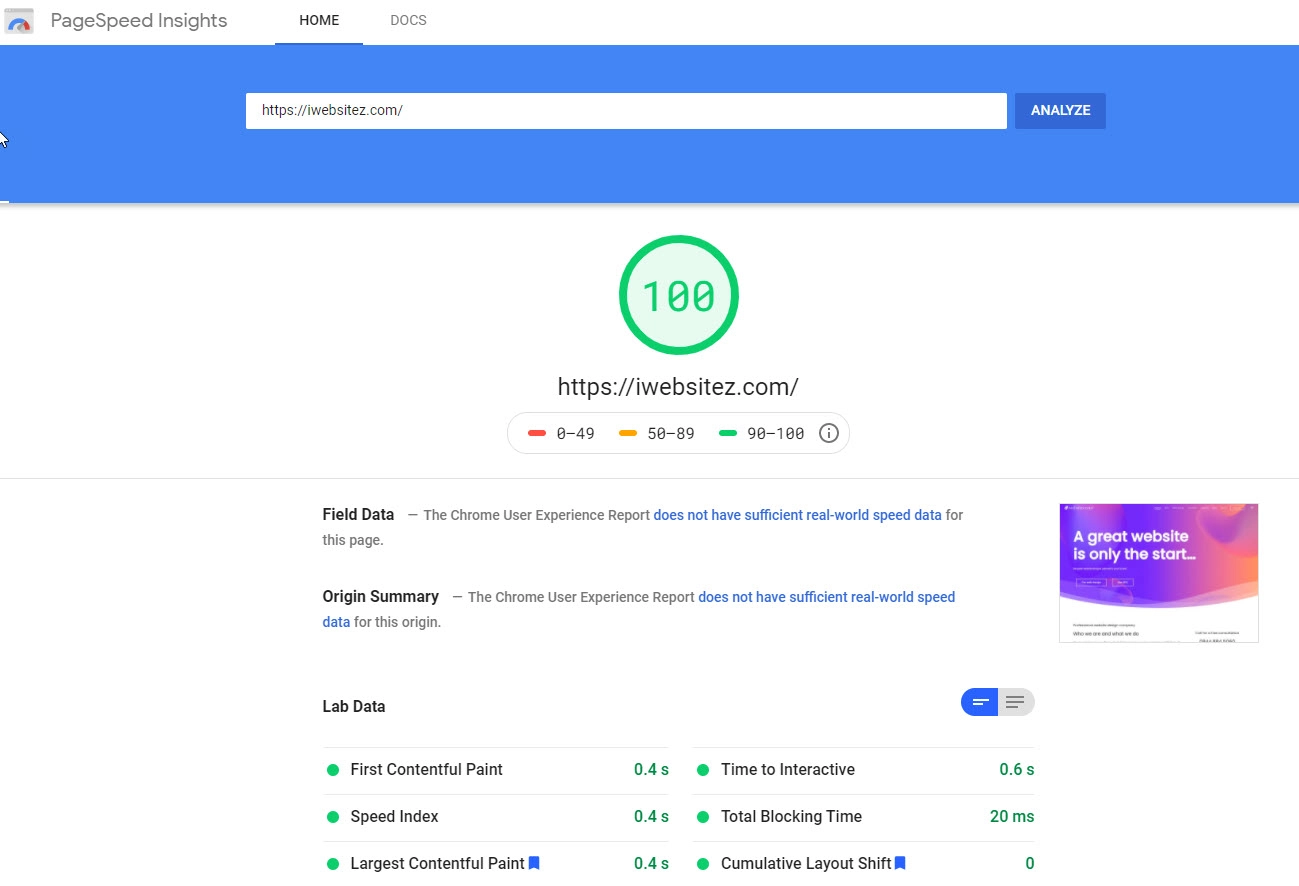
Lighthouse and the lab section of PageSpeed Insights run a simulated test. They are excellent for diagnosing render-blocking resources, unused code, image waste and main-thread work. They can also vary between runs because of server response, test location, network conditions and cache state.
Use lab data to find problems and compare controlled before-and-after tests. Do not treat one unusually good run as proof that every visitor receives the same experience.
Field data
Field data comes from eligible real Chrome users and is assessed at the 75th percentile over a rolling period. This is the evidence that tells you whether real visitors are passing Core Web Vitals across mobile and desktop.
After changing performance settings, monitor Google Search Console and PageSpeed Insights long enough for field data to refresh. Also watch conversions, form completions, ecommerce events and error logs.
Do not optimise the LCP image like an ordinary image
The main hero image is often the Largest Contentful Paint element. Lazy-loading it can delay LCP. Confirm that NitroPack identifies and prioritises the correct above-the-fold image, especially when the image is a CSS background or inserted by a slider.
Our experience
What sort of improvement should you expect?
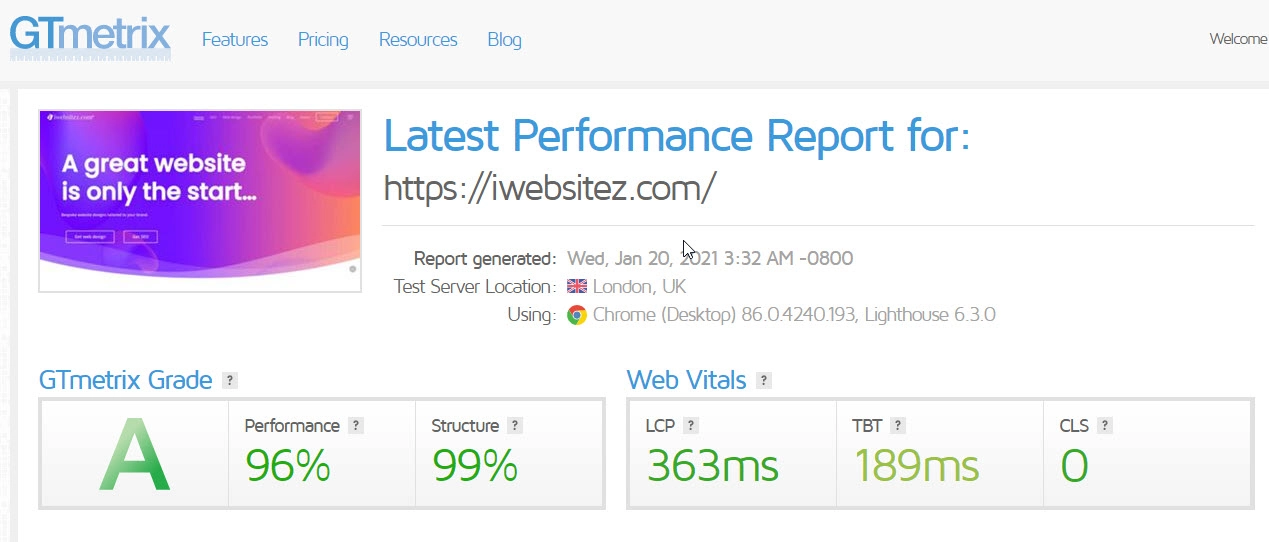
A slow site with uncached HTML, oversized images and blocking CSS or JavaScript has much more room to improve than a carefully built site already passing Core Web Vitals. NitroPack can produce a dramatic lab-score jump, but no responsible review should promise a specific number for every website.
A better test process
How we recommend testing NitroPack
Use the same URLs, devices, test locations and tools before and after. Test more than the homepage, and keep a written record of settings and exclusions.
- 01
Record the baselineTest the homepage, service page, article, contact page, category page and product or checkout journey where relevant.
- 02
Back up and remove overlapCreate a full backup, then disable other page caches, minifiers, script-delay tools and duplicate lazy loading.
- 03
Start in Test ModeUse NitroPack’s test URLs so visitors continue receiving the normal version while you check the optimised output.
- 04
Test functionality firstCheck navigation, sliders, forms, cookie consent, maps, videos, search, filters, login, cart, checkout and payment handoff.
- 05
Warm the cacheConfirm the test page is actually optimised before running PageSpeed Insights, GTmetrix or WebPageTest.
- 06
Compare several runsUse medians rather than celebrating the best result. Compare mobile and desktop separately.
- 07
Monitor real usersWatch Search Console Core Web Vitals, analytics, conversion rates, console errors and support reports after launch.
Installation and configuration
How to set up NitroPack safely
NitroPack is straightforward to connect, but the default Ludicrous mode is intentionally aggressive. A careful launch is better than applying every optimisation to a live commercial site and hoping for the best.
1
Take a full backup
Back up files and database, record the existing cache configuration and save baseline performance reports.
2
Remove duplicate optimisation
Do not run two full-page caches, two JavaScript delay systems or two image lazy loaders against each other.
3
Connect the WordPress plugin
Create the NitroPack account, install the connector plugin and link the website through the setup process.
4
Enable Test Mode
Inspect optimised test URLs privately before changing the version delivered to normal visitors.
5
Choose the right mode
Try Ludicrous, but use Strong when delayed JavaScript affects crucial interactive features.
6
Configure cache warmup
Warm important pages and use the XML sitemap option when it is available on your plan.
7
Test every template
Do not assume a working homepage means product pages, forms, popups and logged-in views also work.
8
Launch and monitor
Purge the old cache, publish the chosen configuration and watch errors, events, orders and enquiries.
Which NitroPack optimisation mode should you choose?
| Mode | Approach | Use it when | Main caution |
|---|---|---|---|
| Standard | Basic, stability-first optimisation | You need the lowest-risk starting point | Smaller performance gain |
| Medium | Moderate optimisation | The site is sensitive and needs a balanced first test | May leave more render-blocking work |
| Strong | Advanced loading without the most aggressive script delay | You want strong results with better JavaScript stability | Usually scores below Ludicrous |
| Ludicrous | Most aggressive preset and current default | The site tolerates delayed non-critical JavaScript | Can affect JavaScript-heavy functionality |
| Custom | Manual feature-level control | You know exactly which resources and operations need exceptions | Requires testing and maintenance expertise |
Dynamic websites
Does NitroPack work with WooCommerce?
Yes. NitroPack is designed to recognise WordPress and WooCommerce behaviour, including session-sensitive pages and cookies. Cart, checkout and other user-specific routes should not be served as ordinary static pages.
Paid plans can also include Cart Cache Optimization, intended to keep store browsing fast when a visitor has products in the basket. That does not remove the need to test variation selectors, mini carts, stock messages, coupons, tax calculation, account pages and payment gateways.
Ecommerce testing must follow the complete transaction journey. Place a test order using each important payment method, verify confirmation emails and analytics events, and then repeat on mobile.
WooCommerce checks before launch
- Product gallery and zoom
- Variation and add-on selectors
- Add-to-basket actions
- Mini cart and basket totals
- Coupons, VAT and shipping
- Checkout validation
- Payment redirects and callbacks
- Account and order history
- Stock and price updates
- Analytics and conversion tracking
Common problems
NitroPack troubleshooting guide
Most problems come from duplicate optimisation, delayed JavaScript or cache rules that do not match the website’s dynamic behaviour.
The design looks broken
Switch from Ludicrous to Strong, purge the cache, identify the affected CSS or JavaScript resource and exclude only the minimum necessary operation.
A menu, slider or popup does not work
The component probably depends on JavaScript that is being delayed. Exclude the relevant script from delay rather than disabling every optimisation.
Changes are not appearing
Invalidate or purge the relevant cache, confirm the new optimisation has completed and check any host, proxy or Cloudflare cache above NitroPack.
PageSpeed still sees the old page
Confirm the URL is eligible and marked as optimised in Cache Insights. A fresh or recently purged URL may not be ready when the test starts.
The LCP image loads late
Exclude the hero image from lazy loading or ensure NitroPack’s LCP logic correctly recognises and preloads it.
Analytics data drops
Check consent mode, Google Tag Manager, analytics loading and conversion events. A delayed tag must still fire accurately after consent and interaction.
Logged-in content is wrong
Review cookies and cache exclusions. User-specific dashboards, memberships and account data should never receive another visitor’s cached version.
Cloudflare behaves unpredictably
Connect the Cloudflare API so caches can be synchronised, and avoid duplicating minification or script features at multiple layers.
Other routes to a faster site
NitroPack alternatives
NitroPack is not automatically better than every caching plugin. It is better suited to a particular buyer: someone who values an integrated cloud service and automated results.
Best traditional premium plugin
WP Rocket
A strong choice for website owners who want a polished WordPress caching plugin with more familiar server-side behaviour. Image optimisation and a CDN are separate considerations, so the full stack may require additional services.
Best on LiteSpeed hosting
LiteSpeed Cache
Particularly compelling when the website is hosted on a correctly configured LiteSpeed server. It offers extensive controls and can be extremely effective, but the interface and tuning are more technical.
Alternative automated optimiser
Seraphinite Accelerator
Another broad WordPress performance tool worth comparing when you want strong automation but do not necessarily want NitroPack’s exact cloud and plan model.
Best for maximum control
Manual optimisation
Clean hosting, page caching, object caching, a carefully configured CDN, local fonts, compressed images and selective code removal can outperform any plugin. It requires development time and ongoing maintenance.
| Factor | NitroPack | Traditional cache plugin | LiteSpeed Cache | Manual stack |
|---|---|---|---|---|
| Processing model | Cloud-connected service | Mainly on your server | Server-integrated plus cloud options | Chosen per component |
| Built-in CDN | Yes | Usually separate | QUIC.cloud integration | Your choice |
| Image optimisation | Included | Often separate | Available through its ecosystem | Your choice |
| Setup effort | Low to moderate | Moderate | Moderate to high | High |
| Granular control | Moderate | Moderate to high | High | Maximum |
| Traffic limits | Plan-based | Usually none in plugin itself | Depends on cloud services used | Depends on providers |
| Best for | Convenience and rapid gains | Conventional WordPress caching | LiteSpeed-hosted sites | Developer-led optimisation |
Final verdict
NitroPack is excellent when convenience has real value
NitroPack deserves its reputation for producing large performance improvements with relatively little configuration. Its strongest use case is a commercially important WordPress website that is slow, technically heavy and expensive to optimise manually.
It is not a substitute for good development, and it should never be judged only by one PageSpeed screenshot. Test the complete user journey, compare real-user data, monitor resource usage and confirm the website still converts.
For the right site, we recommend it. Start on the free or monthly plan, use Test Mode, and move to an annual commitment only after you have verified speed, stability and commercial impact.
Check the current price and plan limits before buying.
Common questions
NitroPack FAQs
Clear answers to the questions website owners ask before installing NitroPack.
Is NitroPack free?
Yes. NitroPack currently offers a limited free plan for one website with 1,000 monthly pageviews and 1GB of CDN bandwidth. It is useful for testing and very small sites. No payment card is required to start the free plan, but the public allowance and features can change.
How much does NitroPack cost?
As of 21 July 2026, NitroPack lists Starter at $8 per month, Plus at $22 per month and Pro at $99.99 per month when billed monthly. Annual billing reduces the effective monthly price to $7, $18 and $83.01 respectively. Agency pricing is custom.
Is NitroPack just a caching plugin?
No. Caching is one part of the service. NitroPack also optimises CSS, JavaScript, HTML, images, fonts and video embeds, warms the cache and distributes optimised assets through a built-in Cloudflare-powered CDN.
Can NitroPack improve Core Web Vitals?
It can improve the technical factors that influence LCP, INP and CLS, including server response, render-blocking resources, image weight, JavaScript execution and layout stability. Results depend on the original site, and real-user field data should be monitored after launch.
Which NitroPack optimisation mode is best?
Ludicrous is the default and most aggressive mode. It often produces the highest laboratory scores by delaying non-critical JavaScript. Strong is usually the safer option for JavaScript-heavy websites. Use Test Mode to compare the presets before publishing them to visitors.
Can NitroPack break a website?
Any aggressive CSS or JavaScript optimisation can expose compatibility problems. Menus, sliders, forms, cookie tools, galleries and ecommerce interactions need testing. NitroPack provides Test Mode, alternative presets and excluded-resource controls to resolve most conflicts.
Can I use NitroPack with WP Rocket or Autoptimize?
You should not run overlapping full-page caching, minification, script delay or lazy loading features in multiple plugins. Remove or disable duplicate optimisation before activating NitroPack. Security, backup and unrelated functionality plugins can remain.
Does NitroPack work with WooCommerce?
Yes. NitroPack supports WooCommerce and automatically handles important session-sensitive behaviour. Cart, checkout, account pages, variation selectors, payment gateways and analytics should still be tested before launch.
Can NitroPack work with Cloudflare?
Yes. NitroPack’s built-in CDN is powered by Cloudflare, and it can also work when your domain already uses Cloudflare. Configure API access so cache purges can be synchronised and avoid enabling the same optimisation at both layers.
What happens if I exceed the NitroPack plan limit?
NitroPack states that optimisation stops until the next billing cycle when the allowance is exceeded unless Resource Overages is enabled. Resource Overages lets you set a budget for additional pageviews or bandwidth so delivery can continue.
Does NitroPack cheat PageSpeed Insights?
NitroPack changes the way the page and its resources are cached, prioritised and delivered, so PageSpeed Insights tests the optimised output. The correct question is whether real visitors receive a fast, stable and fully functional page. Verify field data, interactions and conversions rather than relying on one score.
What happens if I uninstall NitroPack?
The connector and NitroPack-generated delivery code are removed, while your original website files and images remain. Uninstalling the plugin does not automatically cancel a paid subscription, so cancellation must also be completed in the NitroPack account.
Is NitroPack good for SEO?
A faster and more stable website can improve user experience and help a site pass Core Web Vitals, but NitroPack is not an SEO strategy. It does not replace useful content, crawlable architecture, internal linking, backlinks, local optimisation or conversion-focused design.
Is NitroPack worth paying for?
It is usually worth considering when a slow commercial website needs broad optimisation and the owner values automation. It is harder to justify for a low-traffic hobby site, a site already passing Core Web Vitals, or a developer who prefers a self-hosted manual stack.
Research and transparency
Sources used for this update
Product details and prices were checked against official NitroPack material. Core Web Vitals definitions and thresholds were checked against Google’s web.dev documentation. External product claims can change, so this article is dated and should be reviewed periodically.
